The free demo shows the globe and its 40 planetary lines using example charts. A map calculated from your birth date, exact birth time and birthplace costs €9.99 once. It includes city readings and has no subscription.
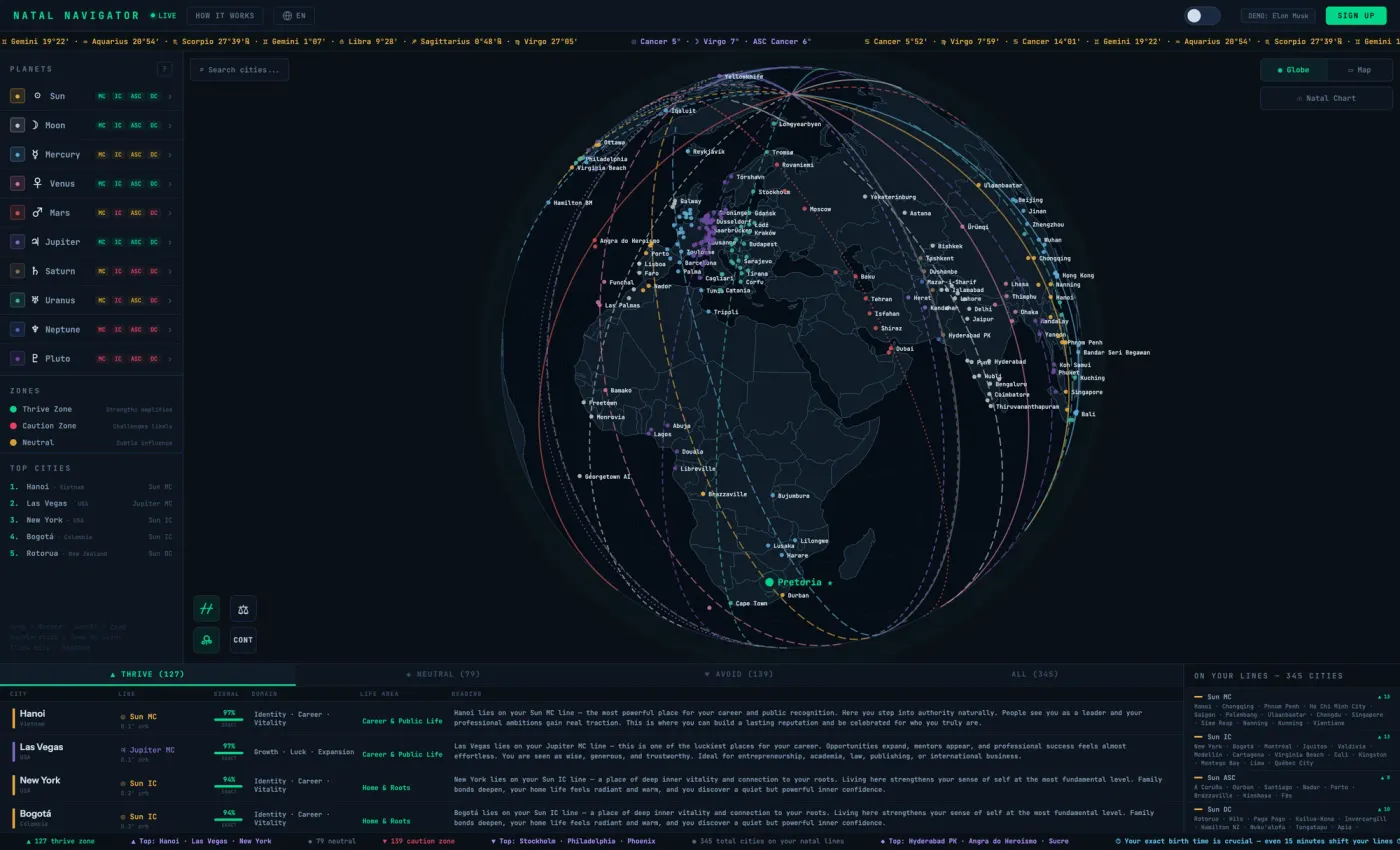
How an astrology birth chart becomes a map
A natal chart fixes the positions of the Sun, Moon and planets at your birth moment. Astrocartography keeps that moment and looks across Earth for places where each body was rising (ASC), setting (DSC), highest (MC) or lowest (IC). That produces four lines per body. For example, a Sun–MC line marks places where the Sun was on the meridian at your birth; a Sun–IC line marks the opposite meridian. They share the Sun theme but emphasize different angles of the chart.
In the example-chart demo, open the planet controls and isolate the Sun. Switch between MC and IC, then inspect a city on or near a line. You can see the map, line label and city context before deciding whether a personal calculation is useful. The astrology birth chart guide explains signs, planets, houses and angles; the astrocartography guide explains how to read the map.
How the calculator works
- Enter your birth date. The calendar accepts any year — historical births are fully supported.
- Enter your exact birth time. As precise as possible. Every four minutes shifts your Ascendant and Descendant lines by roughly one degree of longitude.
- Search for your birth city. We auto-resolve latitude, longitude and historical time zone (including DST in force on that date).
- Purchase your personal map. After exploring the free example-chart demo, pay €9.99 once to use your own birth data.
- Explore your globe and cities. View your planetary lines on the rotating 3D Earth and inspect city readings.
Explore the example-chart demo first
The demo shows how the globe, lines and city readings work with example data. It does not calculate a map from your birth details. Create your personal chart when you want your own map and city readings.
What you get
- 40 astrocartography lines across ten planets (Sun, Moon, Mercury, Venus, Mars, Jupiter, Saturn, Uranus, Neptune, Pluto) and four angles (MC, IC, ASC, DC).
- Color-coded zones — green thrive, yellow neutral, red caution — so you can scan the energetic landscape at a glance.
- Real-world city matching — every line surfaces the nearest cities so you can connect astrological theory to actual places.
- Interactive 3D globe powered by D3.js with smooth rotation, zoom, and touch support.
- Your natal wheel alongside the globe, showing zodiac positions, house placements, and retrograde markers.
- Filter tabs for isolating only thrive, only caution, or only neutral zones — ideal for focused exploration.
How accurate is the calculator?
Natal Navigator uses the open-source Astronomy Engine library. Its documentation describes typical geocentric position accuracy within approximately one arcminute. The Ascendant and Descendant lines are then derived by Natal Navigator's own solver and projection.
Uncertainty is therefore not limited to one component. Personal line placement also depends on the accuracy of birth time and place, historical time-zone conversion and projection geometry. If the recorded birth time is approximate, the resulting angular lines should be treated as approximate too. The full method is documented on our methodology page.
Choose the right kind of calculator
Some services calculate a personal astrocartography map for free. Natal Navigator's free access is an example-chart demo; its personal map is paid. Compare current features and privacy terms before choosing a tool.
| Question | What to check | Natal Navigator |
|---|---|---|
| Personal map price | Free, one-time or subscription? | €9.99 once |
| Preview | Can you inspect the interface before paying? | Free demo with example charts |
| Map and cities | Can you zoom, filter lines and inspect cities? | 3D globe, line filters and city readings |
| Calculation | Are birth-time needs, methods and limits explained? | Methodology and limitations |
Calculator, app or software — which do you actually need?
A calculator produces a map from birth data. Some provide that personal calculation free; others charge once or use a subscription. The useful comparison is what each service lets you inspect: line labels, map controls, city information, methodology and data handling.
Natal Navigator runs in a mobile browser and displays the line map alongside a natal wheel. Its 3D globe helps you explore the display, but a globe alone cannot establish greater calculation accuracy or predict what will happen in a city. If you need a full relocated chart with destination-specific houses and angles, use a tool that explicitly offers that calculation; our relocation guide explains the distinction.
Frequently asked questions
What does the astrocartography calculator cost?
You can explore the demo globe with example charts first. A personal 40-line astrocartography map with your real birth data is available for a one-time payment of €9.99.
How accurate is the calculator?
We use Astronomy Engine, whose official documentation describes typical geocentric position accuracy within about one arcminute. Personal lines also depend on birth data, time-zone conversion and projection geometry.
Can I try the demo without an account?
Yes. You can explore the globe with example charts without creating an account or paying. A map calculated from your own birth data costs €9.99 once.
Does the calculator work on mobile?
Yes. The globe is built to be responsive and supports touch gestures for rotation and zoom on any modern mobile browser.
What data do I need to enter?
Three inputs: your date of birth, your exact time of birth, and your birth city. Everything else — time zone, coordinates, planetary positions, line paths — is resolved automatically.
What if I don’t know my exact birth time?
You can still run the calculator, but be aware: the MC/IC lines move about 15 degrees of longitude per hour of time difference, and ASC/DC can move even faster near the poles. Treat the output as directional rather than precise.
Is my birth data stored?
Birth data linked to your account is stored securely and encrypted at rest. Demo-mode input is never persisted. You can delete your account and its data at any time.