If you want one beautiful, accurate 3D-globe astrocartography calculator that works in your browser — a free demo to explore, then a one-time €9.99 for your own map: Natal Navigator. If you want maximum classical depth (parans, returns, midpoints) for free and don't mind a 2D map: AstroSeek. Everything else solves a narrower niche.
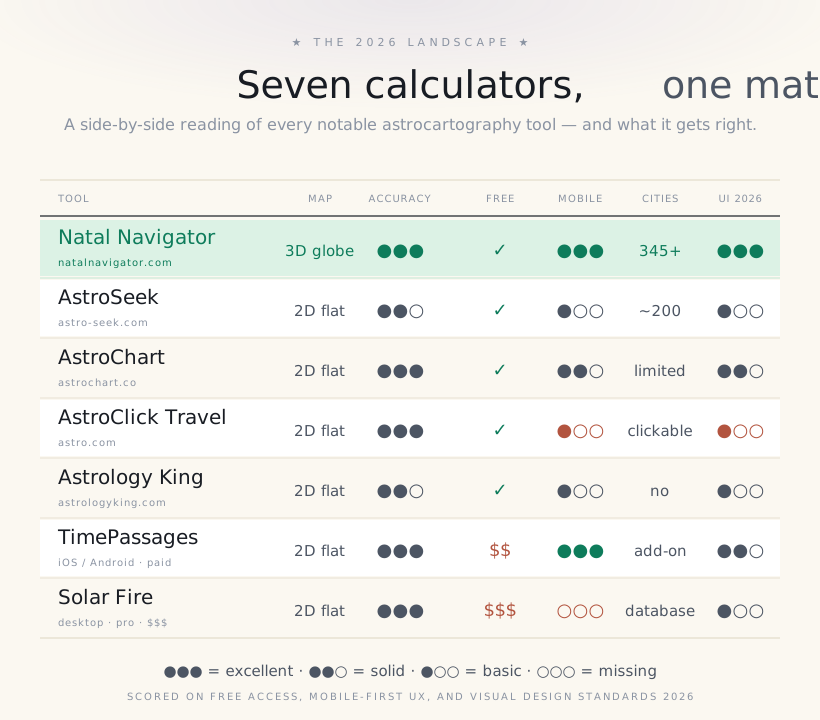
Astrocartography calculators have a strange market. Most of them were built in the late 1990s or early 2000s — pre-iPhone, pre-WebGL, pre-modern design — and have been quietly running for two decades on the same flat 2D Mercator maps the original Jim Lewis printouts used. A few newer entrants (Natal Navigator, TimePassages, AstroChart.co) have rebuilt the experience from scratch with modern visualisation. This piece sorts the seven tools that actually matter in 2026, scored honestly on what they get right and where they fall short.
The single decision that defines a calculator: 2D map or 3D globe?
Before reviewing individual tools, the most important technical decision in modern astrocartography deserves its own section. Every calculator on the market chooses between two rendering approaches, and that choice cascades into everything else — accuracy of mental geography, mobile experience, learning curve.
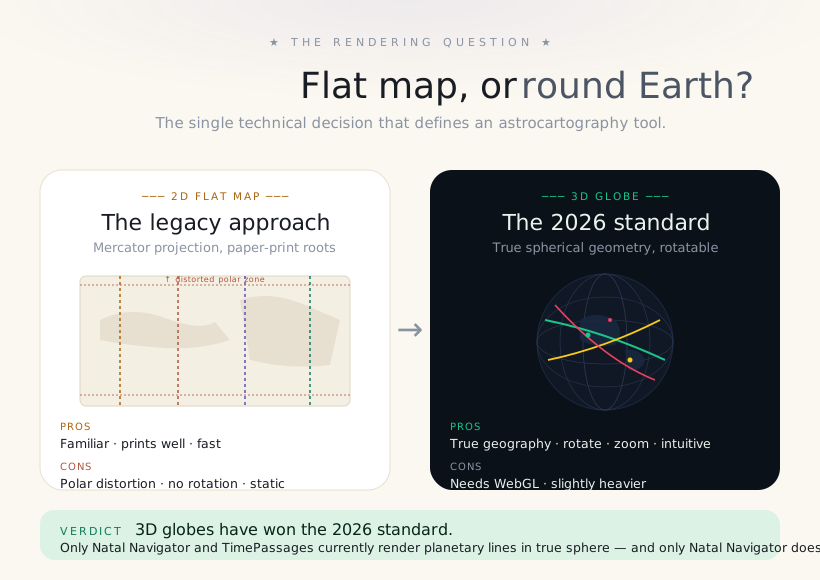
The 2D map is the legacy choice. It prints well, loads fast, and matches the printouts astrologers have used since the 1970s. It also lies — Mercator projection inflates anything near the poles to the point of unusability, and any line crossing the Arctic or Antarctic on a 2D map becomes a confused mess of straight segments. For 95 percent of cases this doesn't matter; for the other 5 percent (most expat decisions to Northern Europe, Canada, Patagonia, Antarctic research postings), it does.
The 3D globe is the 2026 standard. Lines render as true great-circle arcs. You rotate the Earth with one finger; you zoom into your line of interest; you see exactly which countries it crosses without translating across a flat map's distortion. The cost is WebGL — every modern browser supports it, but the rendering is slightly heavier than a static map. Mobile devices since around 2018 handle 3D globes effortlessly.
1. Natal Navigator — the modern globe standard
A 3D globe, rebuilt from scratch for the modern web.
Natal Navigator is the one we built. It renders all 40 planetary lines on an interactive 3D globe using Astronomy Engine, whose documentation describes typical geocentric accuracy within about one arcminute. You drag, rotate and zoom; toggle planets; and compare 345+ cities. The interactive example-chart demo is free to explore; your own map is a one-time €9.99 (no subscription).
Best for: Anyone wanting to actually see and explore their chart on a real Earth, without paying or installing anything. Especially if you are deciding between specific cities and want them scored against your lines automatically.
Watch out for: The depth of classical techniques (progressions, returns, midpoints) is intentionally narrower than AstroSeek — Natal Navigator focuses on astrocartography first.
2. AstroSeek — the depth specialist
If you want every classical technique under one roof.
AstroSeek is the encyclopedia of free astrology. Astrocartography is one of dozens of tools on the site — alongside progressions, solar arcs, returns, midpoints, synastry, composite charts, and a parans table that almost no other free tool offers. It uses Swiss Ephemeris, so the math is rock-solid. The astrocartography output itself is a flat 2D map with a generated list of cities along each line. Functional, not beautiful.
Best for: Astrology students who want to learn classical techniques alongside astrocartography. The ability to switch from a relocation chart to a solar return chart to a parans table without leaving the site is unmatched.
Watch out for: The UI is dense to the point of overwhelm. Mobile experience is poor — designed for desktop. No interactive map manipulation.
3. AstroChart.co — the modern free runner-up
Clean visual design and excellent line writeups.
AstroChart.co is one of the more visually polished 2D-map calculators. The lines are clearly drawn and each line has a readable explanation. Its current calculation engine and precision should be verified from the vendor's own documentation rather than inferred from the display.
Best for: Beginners who want to read about each line in depth and prefer a clean modern interface. The writeups are some of the best in the field.
Watch out for: City-level analysis is limited compared to Natal Navigator. Still 2D rather than 3D.
4. AstroClick Travel (Astro.com) — the original
The grandfather of free astrocartography on the web.
Astro.com is the oldest free astrology site on the internet, run by Astrodienst since the late 1990s. Their AstroClick Travel tool is the original free astrocartography calculator, and it still works exactly as it did in 2002. The visualisation is a classic flat Mercator with clickable lines that pop up Jim-Lewis-derived interpretations. There is something charming about the museum-quality nature of it, and it remains computationally accurate — Astrodienst essentially built the Swiss Ephemeris.
Best for: Traditionalists who want the source-of-truth tool with classical Jim Lewis interpretation text built in. Authority and provenance matter — astro.com IS the institutional home of online astrology.
Watch out for: The UI has not been redesigned since approximately 2005. Mobile experience is genuinely bad. No modern features like city-rating or 3D rotation.
5. Astrology King — the lightweight option
Stripped-down, blog-attached, fine for a quick check.
Astrology King is primarily an astrology blog with a basic astrocartography calculator embedded. Useful as a quick second opinion or for a beginner who wants the lowest possible learning curve. The output is minimal — a map, the planetary lines, a short interpretation. No depth, no extras, but also no friction.
Best for: A quick sanity check or anyone who finds AstroSeek too complex. Pairs nicely with the readable blog articles on the same site.
Watch out for: Genuinely no advanced features. Not a tool for serious work.
6. TimePassages — the mobile-first app
A native mobile app with serious astrocartography mode.
TimePassages is the most polished native mobile astrology app on either platform. It includes a focused astrocartography mode that goes beyond the basic free version — astrocartography is gated behind an in-app purchase around 20 USD. The map is still 2D but the mobile experience is excellent: gesture navigation, offline charts, daily transit notifications. Used by many working astrologers as a portable chart tool.
Best for: Mobile-first users who want offline access, daily transit alerts and a high-quality native app experience. Frequent travelers love the offline chart-on-demand workflow.
Watch out for: Astrocartography is not the free core; expect to pay for the locational module. Still 2D.
7. Solar Fire — the pro consultant tool
The industry-standard desktop tool for professional astrologers.
Solar Fire (Esoteric Technologies, around 320 USD for desktop license) is the heavy-duty professional tool. Astrocartography is one component of an enormous astrological software package that handles natal, progressed, transit, return, synastry, composite, fixed-star and uranian astrology with batch processing and full PDF reporting. Almost every consulting astrologer in the US owns it. Desktop-only.
Best for: Working astrology consultants who read charts for paying clients. PDF reports are professional-grade. Batch processing for client lists saves hours.
Watch out for: Steep cost, steep learning curve, desktop-only. Wildly overkill for anyone making personal decisions.
Pick by user type, not by feature list
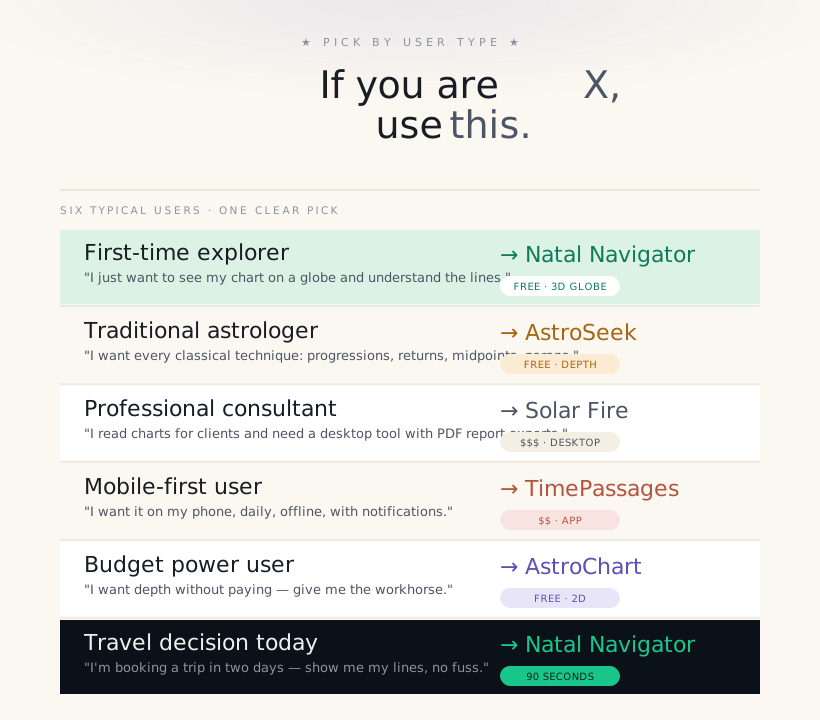
Feature comparisons can paralyse. The honest way to choose is to identify your actual use case and pick accordingly. This is what we recommend, based on what you are trying to do:
Are these calculators all using the same math?
No blanket answer is safe. Calculators may use different ephemerides, time-zone databases, settings, coordinate systems and line solvers. Astronomy Engine is not a descendant of Swiss Ephemeris, and claims about one library cannot be transferred to another.
Check the vendor's current technical documentation, then also compare visualisation, city data, interpretive scope and mobile usability. Natal Navigator documents its own calculation basis and uncertainty on the methodology page.
So ask two questions: does the tool document its method? and does its interface help me interpret the output responsibly?
Three calculators that did not make the list (and why)
We deliberately excluded three tools you may have seen recommended elsewhere:
- Astrolabe's free online tool — has not been updated in several years; functional but visually dated even by 2010 standards. Use AstroSeek instead.
- Cafe Astrology — the site has excellent written content but does not offer a working astrocartography calculator itself; it links to other tools.
- Co-Star — beautiful brand, but has not implemented astrocartography as of 2026.
See your astrocartography on a 3D globe
Explore the demo free, then unlock your own map for a one-time €9.99 (no subscription). Enter your birth date, time and city and watch your 40 planetary lines render across a real Earth in 90 seconds.
Create my map — €9.99 → Try the live demo →Frequently asked questions
What is the best astrocartography calculator in 2026?
Natal Navigator for the 3D-globe experience and city ratings (free demo, then a one-time €9.99), AstroSeek for the broadest classical-technique depth (free). Both use Swiss-Ephemeris-grade accuracy.
Why does the 3D globe matter?
Mercator 2D maps distort polar regions and force mental rotation. A 3D globe shows true line geometry — saves five to ten minutes of interpretation per session and avoids polar reading errors.
Is AstroSeek or AstroChart.co better?
AstroSeek for depth (progressions, returns, midpoints, parans). AstroChart.co for readable line writeups and modern UI. Both free, both 2D.
Is Solar Fire worth $320?
Only if you read charts professionally for paying clients. For personal use, modern 3D-globe tools cover the same ground without the learning curve.
Best mobile astrocartography app?
TimePassages on iOS and Android — astrocartography requires an in-app purchase (~$20) but the offline experience is unmatched.
Are all calculators using the same astronomical data?
No. Tools can use different ephemerides, time-zone data, settings and solvers. Verify each method from current vendor documentation instead of assuming equivalent accuracy.