You typed your birth time into Astro.com astrocartography, the map loaded — and then you sat there. Coloured lines everywhere, tiny labels, a flat world that makes Greenland look like a continent. The data is some of the best on the web. The experience is from a different decade. If you have ever opened AstroClickTravel and quietly closed the tab again, this guide is for you: first how to read the Astro.com map properly, then five modern alternatives — including the one we built, on a 3D globe.
Astro.com's astrocartography (AstroClickTravel) is free and astronomically accurate, but it draws your lines on a distorting 2D Mercator map with a dated interface. To read it: enter exact birth data, open Extended Chart Selection → AstroClickTravel, learn the four line types (AC, DC, MC, IC), and read planet + angle together. For an easier view of the same data, a 3D-globe tool like Natal Navigator removes the distortion and rates cities for you.
First: where astrocartography hides on Astro.com
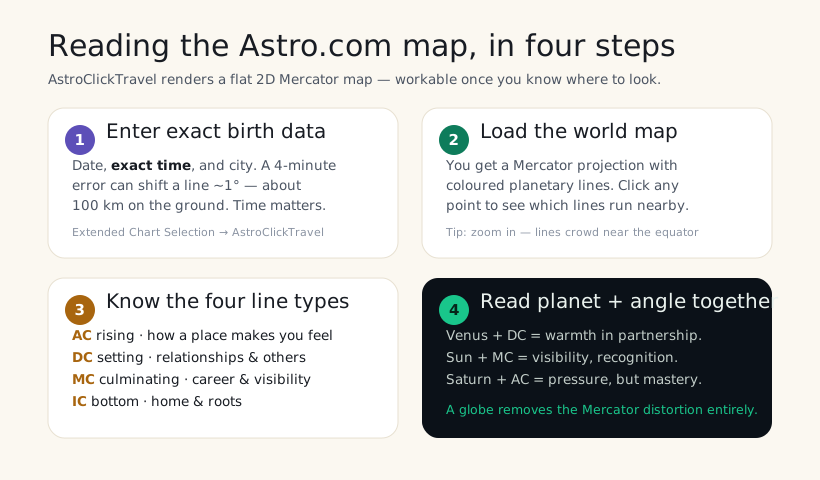
Half the frustration is just finding it. Astro.com does not put astrocartography on the homepage. The path: create or select your chart, open Extended Chart Selection, then pick AstroClickTravel from the long method dropdown. The world map loads with your planetary lines, and clicking anywhere reveals which lines pass nearby. It is genuinely buried — if you have only ever seen Astro.com's birth-chart wheel, you would never know the travel map exists.
How to read the AstroClickTravel map
Every planet draws up to four lines across the Earth, one for each angle of the chart. Once you can name the four, the map stops being noise:
- AC (Ascendant) line — where a planet was rising. This is the most personal: it colours how you feel and come across in that place.
- DC (Descendant) line — where a planet was setting. This is about relationships and the people you draw toward you.
- MC (Midheaven) line — where a planet was culminating. Career, reputation, visibility, public life.
- IC (Imum Coeli) line — the chart's base. Home, roots, family, your private inner world.
Then you read planet plus angle as a phrase. Venus on the DC reads as warmth and ease in partnership. Sun on the MC reads as visibility and recognition. Saturn on the AC reads as weight and pressure — but also discipline and mastery. None of the lines are simply "good" or "bad"; each just amplifies a theme. Our full guide to all 10 lines and the how-to-read-your-map walkthrough go deeper on each.
Why the Astro.com map feels so hard
It is not you. Two design choices make AstroClickTravel a struggle:
- The Mercator projection. A flat map stretches everything near the poles, so a line crossing northern Canada or Scandinavia looks wildly different from how it actually curves around the planet. You end up doing geometry in your head.
- An interface from an earlier web. Dense controls, small type, no city ratings, weak on mobile. Astro.com was a pioneer — and it shows its age. The accuracy never aged; the usability did.
This matters because astrocartography is supposed to help you make a real decision — where to travel, where to move, where to begin again. A map you can barely read quietly talks you out of the question.
5 simpler alternatives to Astro.com astrocartography
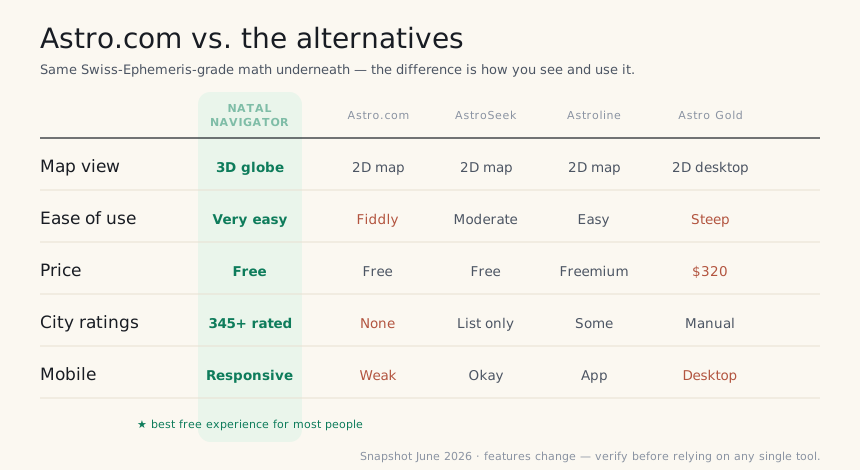
Here is the honest part. All of these read the same Swiss-Ephemeris-grade astronomy as Astro.com — so you lose nothing in accuracy. What changes is how fast you get to an answer you can actually act on.
1. Natal Navigator — the easy modern default
The same lines as Astro.com — on a real, rotatable Earth.
This is the one we built, specifically because the Astro.com map defeated us too. It renders all 40 of your planetary lines on an interactive 3D globe: you drag the Earth, zoom into the line you care about, and read it without any Mercator mental gymnastics. Then it does the part Astro.com never has — it scores 345+ cities against your specific chart as thrive, neutral or caution, with short written readings for career, home and love. Explore the demo free; your own 40-line map is a one-time €9.99 — no subscription.
Best for: Anyone who came from Astro.com wanting to actually see their lines and compare real cities. Watch out for: it focuses on astrocartography first — for progressions and returns, pair it with AstroSeek.
2. AstroSeek — the free depth specialist
When you want every classical technique under one roof.
AstroSeek is the encyclopedia of free astrology, and its astrocartography sits alongside progressions, returns, midpoints and a rare parans table. The map itself is still 2D, but the depth is unmatched for a free tool, and the city list per line is genuinely useful. If Astro.com appealed to your inner completist but lost you on the interface, AstroSeek is the friendlier sibling.
3. Astroline — the goal-first app
Asks what you want, then highlights the lines for it.
Astroline flips the question: instead of handing you a map and wishing you luck, it asks whether you are looking for love, career, health or growth, then foregrounds the relevant lines. It is a polished mobile app with a freemium model — many of the deeper readings sit behind a subscription — but for goal-driven beginners it is far gentler than AstroClickTravel.
4. Astro Gold — the professional's desktop tool
Consultant-grade, with a consultant-grade learning curve.
If you read charts for paying clients, Astro Gold (and its desktop cousin Solar Fire) is built for you: precise relocation work, transits and progressions over the map, export-ready output. It is not free and not beginner-friendly, but professionals rarely outgrow it. For personal use, it is more tool than most people need.
5. Maphrodite — the precision relocation niche
For people who care most about exact relocation lines.
Maphrodite leans into precision relocation astrology on Swiss Ephemeris data, with a clean app and a focus on finding places where you "thrive." It is narrower than a full astrology suite, but if your one question is genuinely "where should I move," it is a thoughtful, modern alternative to wrestling with Astro.com.
Try the same lines on a 3D globe
If Astro.com lost you, start here instead. Enter your birth date, time and city; watch your 40 lines render on a real Earth in about 90 seconds, with cities scored for you. The demo is free; your own chart is a one-time €9.99, no subscription.
Create my map — €9.99 → Try the live demo →Frequently asked questions
Is Astro.com astrocartography free?
Yes — AstroClickTravel under Extended Chart Selection is free and accurate. The cost is usability, not money.
How do I find astrocartography on Astro.com?
Select a chart → Extended Chart Selection → AstroClickTravel. It is buried; that is the usual sticking point.
Why is the Astro.com map so hard to read?
A distorting 2D Mercator projection plus a dated interface. The Swiss-Ephemeris math is excellent — the presentation is the problem.
What is the best alternative to Astro.com?
Natal Navigator for an easy 3D-globe view with city ratings; AstroSeek for free classical depth; Astro Gold for professionals.
Will I lose accuracy by switching from Astro.com?
No. Almost every serious tool, including Natal Navigator, reads the same Swiss-Ephemeris-grade data. You only change how you see it.